How to Stop VR Motion Sickness: What Works vs What's Hype
Short answer first
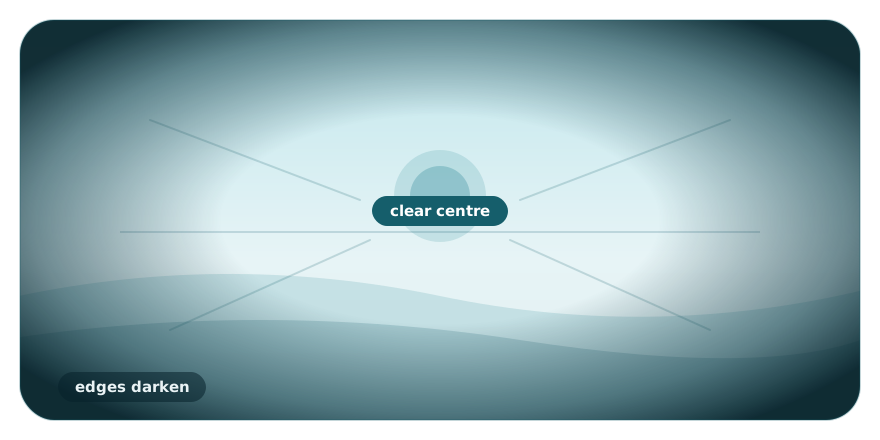
If you are feeling dizzy or nauseous right now and are searching for how to stop VR motion sickness quickly, here is the most effective approach. First, go into your game's settings and turn on the "comfort vignette" (this darkens the edges of your screen when you move). Second, switch your movement settings to use "snap turning" instead of smooth turning. Third, point a physical fan directly at your face, and keep your play sessions very short. Take the headset off the moment you feel warm or queasy.
For most people, this sick feeling is temporary. Your brain simply needs time to adjust to a new way of experiencing the world. By using the right settings, you can greatly reduce your symptoms while your body gets used to virtual reality.
First, why it happens (briefly)
To understand how to stop VR motion sickness, it helps to know exactly why it is happening to you in the first place. It all comes down to a sensory mismatch in your brain. When you walk around in a virtual game, your eyes see motion. They tell your brain that you are moving forward, running, or turning. However, your inner ear—which controls your physical sense of balance—feels you standing or sitting perfectly still in your room.
Your brain gets deeply confused by these mixed signals. It does not know which sense to trust, and this confusion triggers physical symptoms like sweating, dizziness, and nausea. This is commonly known as cybersickness. Certain types of movement, like turning around smoothly in a game, create a much stronger mismatch than simply walking forward. The good news is that we can use specific game settings to reduce this visual mismatch and calm your brain down.
What actually works (strong evidence)
Many guides online will give you a long list of tips, but not all advice is equal. We focus on what has been tested and proven in research. Here are the most effective methods for reducing motion sickness in VR, ranked by the strength of their evidence. You can read more about the studies we cite to see exactly how this research is conducted.
Comfort vignette (Dynamic FOV reduction)
Strong evidence. This is one of the most powerful tools you have against cybersickness. A comfort vignette—often called dynamic field-of-view (FOV) reduction in research—is a setting that automatically darkens or blurs the outer edges of your vision whenever you move in the game. When you walk or turn, the screen corners go dark and you play in a smaller central area. When you stop moving, your full vision returns.
In a 2021 study published in the journal Virtual Reality, researchers Teixeira and Palmisano tested 40 people playing the intense game Marvel Powers United VR over three sessions. They found that turning on a comfort vignette significantly reduced cybersickness during real commercial gameplay. This finding has been corroborated by later IEEE research in 2024 and 2025.
How to do it: Open the settings menu in your VR game. Look for a section called "Comfort," "Accessibility," or "Movement." Find the option labeled "Vignette," "Tunneling," "Blinders," or "FOV Reduction" and turn it on. If it gives you a choice of strength, set it to "High" or "Strong" for your first few sessions.
Snap turning instead of smooth turning
Strong evidence. How you turn your character's body in VR makes a massive difference to your stomach. "Smooth turning" allows you to rotate your view in a continuous, gliding motion using the thumbstick. "Snap turning" (or discrete rotation) instantly turns your view by a set amount, usually 30 or 45 degrees, without showing the visual movement in between.
A 2020 study by Farmani and Teather in the journal Virtual Reality found that using snap turning cut sickness scores by about 40 to 50% compared to smooth movement. A separate threshold study from San José State University (AIAA SciTech 2020) explains the mechanism behind this: rotational optic flow (the visual effect of turning) triggers sickness at significantly lower thresholds than moving forward. In simple terms, turning smoothly is much more nauseogenic than walking forward.
How to do it: In your game's comfort settings, change your rotation style from "Smooth" to "Snap." If the game asks you to set a snap angle, 45 degrees is usually a comfortable starting point. You should also look for a "Teleport" option for moving forward, which skips the visual walking motion entirely and is highly effective for beginners.
Asymmetric / side vignette
Strong evidence. This is an advanced option that some newer games and VR tools are starting to offer. Instead of darkening the entire outer edge of your vision equally, an asymmetric vignette only masks one side of your peripheral vision—specifically, shifting about 17 degrees toward the direction you are turning.
A study by Wu and Suma Rosenberg (IEEE VR 2022) tested 93 participants and found that this asymmetric side restriction significantly reduced sickness compared to having no restriction at all. Importantly, it also preserved the player's overall peripheral visibility much better than a standard, symmetric vignette. If you find standard blinders too distracting, this is a strong alternative.
How to do it: Check if your game offers "Directional" or "Asymmetric" blinders in the comfort menu. Not all games have this yet, but it is becoming more common in advanced VR comfort tools.
Short, gradual sessions (Habituation)
Strong evidence. You cannot force your way through VR nausea. If you try to "tough it out," your brain can start to associate the headset with feeling sick, which may make the problem worse next time. The widely recommended method is habituation: taking short, gentle sessions and stopping before the sickness peaks.
The principle is simple. Over repeated, controlled exposure, your brain learns that the sensory mismatch is safe, and the symptoms tend to fade. This is often called getting your "VR legs." It is one of the most consistently recommended approaches across the research literature, including a 2024 review of 223 cybersickness studies.
How to do it: Limit your first few VR sessions to just 10 or 15 minutes. Pay close attention to your body. The moment you feel a slight headache, a wave of warmth, or a hint of nausea, take the headset off immediately. Wait until you feel 100% normal—even if that takes until the next day—before trying again.
Airflow (a fan on your face)
Commonly reported, limited formal VR evidence. If you ask veteran VR players how to stop VR motion sickness, almost all of them will tell you to point a physical fan at your face while you play. This specific trick lacks the rigorous, controlled VR studies seen with vignettes and snap turning, but it is widely praised in the community, so we flag it honestly rather than overselling it.
Cool air on your skin helps counter the "VR sweats" that often precede nausea, and the steady feeling of wind from one direction can give your brain a physical anchor to the real world, helping ground your sense of orientation.
How to do it: Place a desk or pedestal fan a few feet in front of your play area. Set it to medium or high so you can clearly feel the breeze on your face and arms while wearing the headset.
What's worth trying (mixed / practical evidence)
Beyond the heavily researched settings, several practical steps can make your virtual reality experience more comfortable. These have moderate / practical evidence behind them. They may not solve severe cybersickness on their own, but they create a better environment for your brain and body.
Setting your IPD correctly
Moderate / practical. IPD stands for interpupillary distance—the physical gap between the centres of your eyes. Most VR headsets let you adjust the lenses to match it. If your IPD is set incorrectly, your eyes strain to bring the virtual world into focus, and that eye strain quickly leads to headaches and can add to VR nausea. Measure your IPD (many free smartphone apps can do this) and adjust your headset's lenses accordingly.
Ensuring high frame rates and a good fit
Moderate / practical. If your VR game is lagging, stuttering, or dropping frames, the visual delay will instantly create a sensory mismatch. Make sure your headset is charged, and on PC VR ensure your computer can run the game smoothly. A headset strapped on too tightly can also restrict blood flow and cause tension headaches, so adjust the straps so it rests comfortably without squeezing.
Keeping the room cool and taking breaks
Moderate / practical. Motion sickness naturally raises your body temperature, so a hot, stuffy room only speeds up how quickly you feel ill. Turn on the air conditioning or open a window. Combine this with frequent breaks: even if you feel fine, taking the headset off every 20 minutes to look at a distant object gives your eyes and your vestibular system a rest.
Eating lightly beforehand
Moderate / practical. Playing VR on a completely empty stomach, or right after a large, heavy meal, is a recipe for discomfort. Eat a light, bland snack about an hour before playing. Sipping cold ginger ale or ice water during breaks can also help settle a mildly upset stomach, purely as a comforting measure.
What's probably hype (weak evidence for VR)
When desperate users search for how to stop VR motion sickness, they often run into heavily marketed products that promise a quick cure. As an evidence-based resource, we want to be honest about what the science actually says about these popular remedies.
Ginger supplements
Weak evidence. Ginger root pills and supplements are frequently recommended for sea sickness and general nausea. But the evidence for ginger specifically preventing VR cybersickness is weak and unproven. Sipping a ginger drink might feel soothing, but relying on ginger pills to block the sensory mismatch of virtual reality is likely to disappoint.
Acupressure and Sea-Band wristbands
Weak evidence. Acupressure wristbands, such as Sea-Bands, apply pressure to a point on your wrist and are heavily marketed to travellers. Crucially, there is little to no VR-specific evidence that they reduce cybersickness—they simply have not been shown to work for headset use the way the comfort settings above have. They are cheap and harmless to try, but they do not address the visual–vestibular mismatch causing your symptoms.
Over-the-counter antihistamines
Weak evidence. Medications like dimenhydrinate (Dramamine) or meclizine do have general motion-sickness evidence for car or boat travel. However, their effectiveness specifically for VR cybersickness is not well established in modern headset studies. More importantly, they frequently cause drowsiness, which ruins the active experience of playing. Ask a pharmacist before taking any medication, rather than treating pills as a default solution for gaming.
A simple starter routine
If you are ready to try virtual reality again, do not just put the headset on and hope for the best. Follow this simple routine to protect yourself.
- Prepare your space: point a fan at your play area and make sure the room is cool.
- Check your settings: before you start moving, open the options. Turn on the comfort vignette (blinders) and set rotation to snap turning.
- Pick the right experience: start with games where you stay stationary. Check our VR game comfort ratings to find titles that are gentle on beginners.
- Set a timer: limit your session to 10 or 15 minutes.
- Listen to your body: if you feel even slightly warm, dizzy, or off-balance, stop immediately.
If you want settings matched to your specific symptoms and setup, you can run the comfort & severity check on our homepage.
When to see a doctor
Remember that this article provides general information, not medical advice. For the vast majority of people, cybersickness is a harmless, temporary frustration that fades shortly after taking the headset off. However, you should consult a healthcare professional if your dizziness or imbalance lasts for hours or days after playing, if your symptoms return when you are not using a headset at all, or if you have a known history of inner-ear or vestibular conditions. Always prioritise your physical health over virtual experiences.
Frequently asked questions
How do I stop motion sickness in VR fast?
Does the comfort vignette setting really work?
Will VR motion sickness go away on its own?
Do anti-nausea wristbands work for VR?
How long should my first VR sessions be?
This is general, evidence-based information, not medical advice. If dizziness or imbalance persists long after VR, or you have a known ear/vestibular condition, see a doctor.